Introduction
Are you trying to learn dbt and understand what it’s all about? Are you:
Even more confused after reviewing the complex documentation?
Frustrated at having to set up so many things before getting to what dbt is?
This post is for you.
dbt enables data engineering best practices with just SQL.
By the end of this post, you will know.
- How dbt works
- How to use dbt
- Build and run an end-to-end dbt project
Code along project
Follow along by running the project on GitHub Codespaces (Recommended) or set up locally.
In your terminal, run the following command.
- 1
- Simulate an EL process to load data into warehouse
- 2
- Clean up old code (if any)
- 3
-
Load seed data from
./datafolder - 4
-
Run models in
models/bronzefolder - 5
- Create SCD2 table
- 6
-
Run models in
models/silverandmodels/goldfolder - 7
- Run tests
- 8
- Create and serve documentation
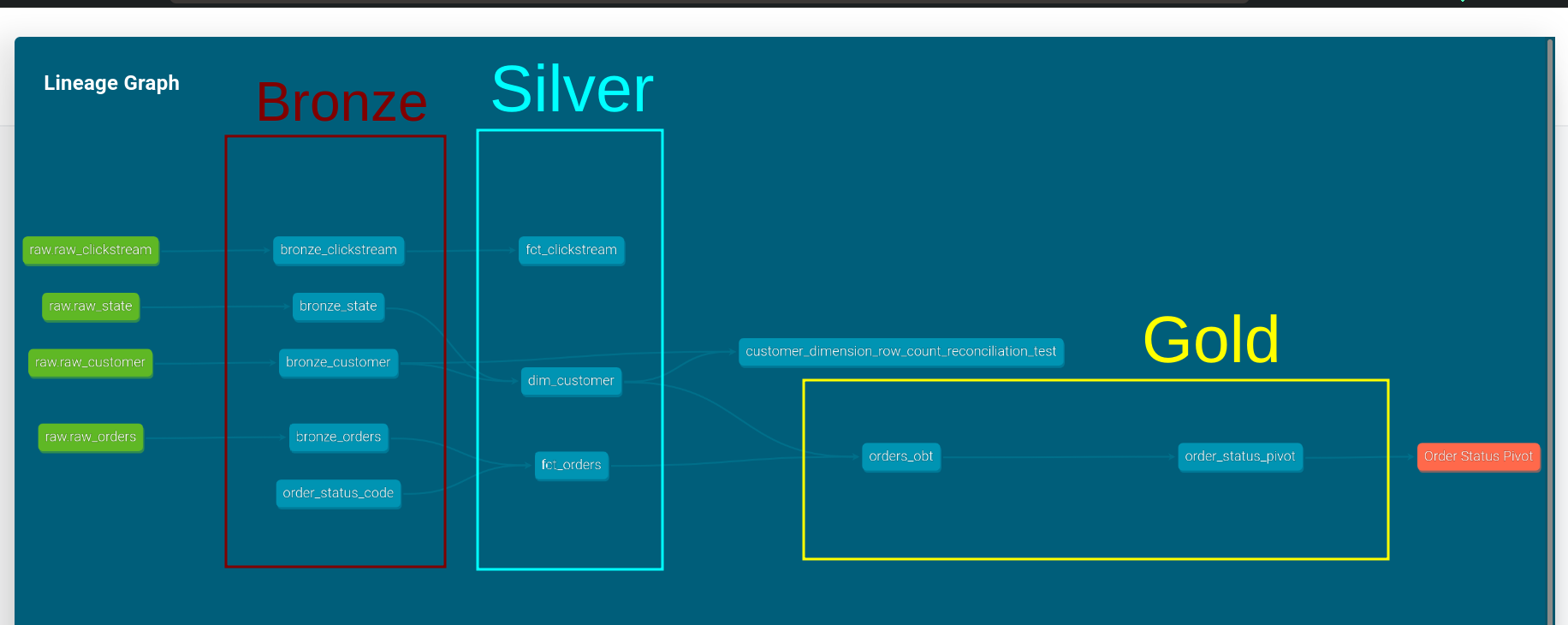
The docs site will open; click on the lineage icon on the bottom right to see the end-to-end lineage.
We use uv run in front of all our commands.
uv is a fast python package manager, and uv run runs our commands inside a virtual env defined by pyproject.toml
We will go over each of these commands below.
Video walkthrough
dbt enables anyone with SQL knowledge to build data pipelines
dbt does this by
- Creating datasets with just SQL SELECT statements.
- Using code to understand dataset lineage.
- Defining data quality testing & documentation as part of the code.
- Enabling reusable code with SQL functions (macros) & dbt packages.
- Having helper functions to create SCD2 and incremental pipelines.
Cheap storage has made loading source data into a warehouse and then transforming it (ELT) popular.
dbt (data build tool) brings best practices to the T in ELT.
dbt is select statements (models) connected with the ref function
Select statements are the pipeline’s building blocks
dbt is built on files with SQL select statements, called models. Models can be referenced by other models.
The file name is the model name.
Let’s look at an example:
./models/silver/fct_orders.sql
- 1
-
Using a model called
bronze_orders - 2
-
Using a model called
order_status_code - 3
- The model file should end with a SELECT statement.
When we run dbt, these models will be created as tables, views, or materialized views in the database (see here for details).
When we run our pipelines, dbt will compile this into a SQL CREATE statement.
Let’s look at the compiled version of the above model.
./target/run/sde_dbt_tutorial/models/silver/fct_orders.sql
create table
"dbt"."main"."fct_orders__dbt_tmp"
as (
with orders as (
select *
from "dbt"."main"."bronze_orders"
),
order_status_code as (
select *
from "dbt"."main"."order_status_code"
)
select o.*
, sc.order_status_code
from orders o
left join order_status_code sc
on o.order_status = sc.order_status
);- 1
- Create table added
- 2
- ref replaced with actual DB table/view
dbt uses the ref function to understand model creation order
From our data lineage, we see that bronze_orders and order_status_code models need to be created before the fct_orders model.
dbt uses the ref function to determine this order.
./models/silver/fct_orders.sql
- 1
-
Using a model called
bronze_orders - 2
-
Using a model called
order_status_code
The ref function only works on models created by dbt.
For tables/views created outside of dbt use the source function.
./models/bronze/bronze_state.sql
- 1
-
Use the table
raw.raw_state.
The table raw.raw_state was created by our EL process. We need to define these source models as shown below.
./models/bronze/raw.yml
- 1
- Tables imported via EL process
Video walkthrough
Yaml files define how dbt operates
dbt has multiple configurations that we can use (e.g., should models be views or tables?). We can define these in three main places:
dbt_project.yml: This file is mandatory. In this file, we define the following:- Project name & version
- Folders for specific dbt commands
- Folder & file level configurations
- Individual
yamlfiles per folder. While we can define everything indbt_project.yml, split configs into individual files per folder for manageability. E.g., models/bronze/bronze.yml - As Jinja configs per model. E.g. Incremental logic in models/silver/fct_clickstream.sql and SCD2 logic in scd2/dim_customers.sql.
We use profiles.yml to define the connection to our warehouse. We can define multiple connections and set a default one with a target.
We can quickly switch targets with the --target flag in dbt commands.
./profiles.yml
- 1
-
Project id (must match one in
dbt_project.yml) - 2
- duckdb connection is just a local file
Video walkthrough
Using multi-hop architecture to model data for analytics
dbt project structure is complex, so we use a standard multi-hop architecture.
Bronzeis source data as-is with data type conversionsSilveris data modeled as facts and dimensionsGoldis summary tables for stakeholders
We create one folder per layer of our architecture.
We define bronze as views, since the data is already in the warehouse and we only need to perform data-type cleanup.
- 1
-
A
+applies config to all models in this folder
Let’s run the bronze models.
The --select enables us to choose the models to run. We run all the models in the bronze folder.
Silver layer models data as facts and dimensions. We create: fct_orders, fct_clickstream, and dim_customer.
We model our dim_customer as SCD2. dbt requires that we run a dbt snapshot command to create SCD2 tables.
Read more about SCD2 here
- 1
-
Creates the
dim_customerSCD2 table - 2
-
We load in data from data/order_status_code for
fct_orders - 3
- We create all the silver and gold models.
Video walkthrough
Read more about incremental tables here.
dbt packages are open-source data transformation code
In the gold layer, we create a model called order_status_pivot for the marketing team.
./models/gold/marketing/order_status_pivot.sql
- 1
-
pivot from
dbt-utilspackage - 2
-
get_column_values from
dbt-utilspackage
We define the packages we need in the packages.yml file and when we run dbt deps dbt downloads them.
Run tests on materialized models
We can run tests on materialized models. There are 3 types of tests:
dbt tests: dbt comes with unique, not_null, accepted_values, & relationships tests. Reference docs.dbt-expectations: Great expectations equivalent for dbt. Has a lot of complex tests. Reference docs.Custom tests: We can create custom SQL-based tests. E.g. reconcilation tests
We define tests in our yaml configs, as shown below.
./models/silver/silver.yml
- 1
- Model to test
- 2
- Column on which the test is run
- 3
-
Type of test to run on
customer_id
dbt tests do not follow the WAP pattern because data must be present to run them.
Read more about WAP pattern for data quality checks here ->
See entire data lineage with dbt docs
Create dbt docs and serve them as shown below:
Exposures show which of our models are used by stakeholders, ./models/exposure.yml.
Video walkthrough
Conclusion
To recap, we saw
- How dbt helps build pipeline with only SQL
- How models and ref functions are the core of dbt
- How yaml files define dbt operations
- Multihop architecture in dbt
- How to run dbt tests
- How to create documentation
Learning and understanding dbt can also significantly improve your odds of landing a DE job.
dbt can help you make your ELT pipelines stable and development fun. If you have any questions or comments, please leave them in the comment section below.